Android & iPhone ยท free

Mornings,
handled.

An alarm clock that makes you finish a challenge before it stops. It also handles prayer times, medicine, your to-do list, alarms you share with other people, and something to fall asleep to.

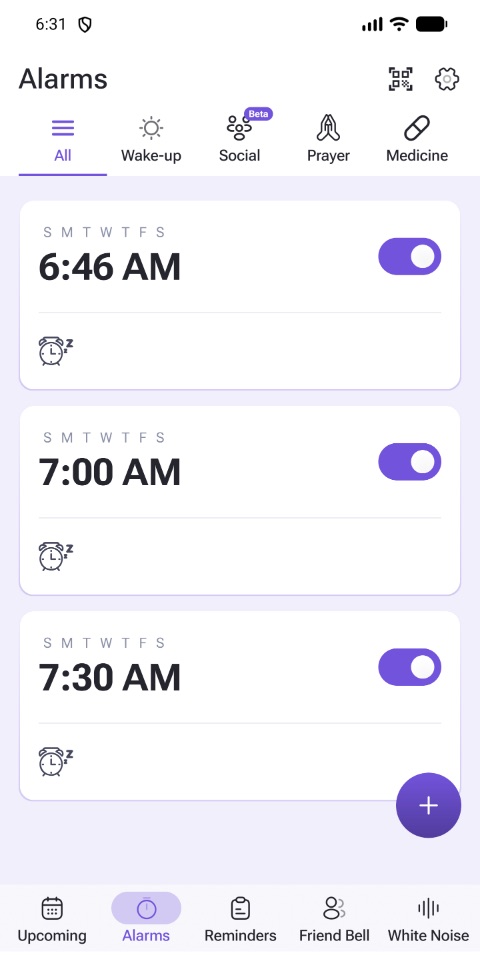
The Alarms screen in Blink Alarm, with tabs for wake-up, shared, prayer and medicine alarms
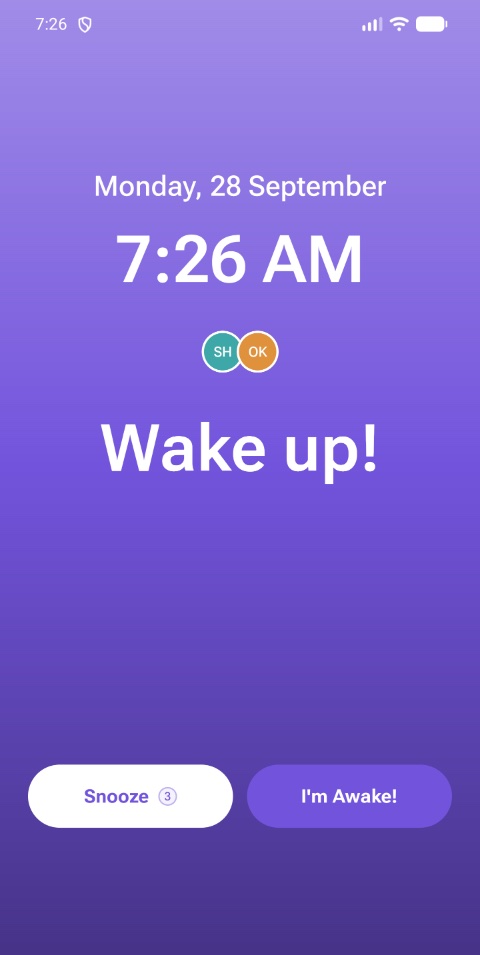
A shared alarm ringing in Blink Alarm, showing who else it woke and buttons to snooze or confirm you are awake
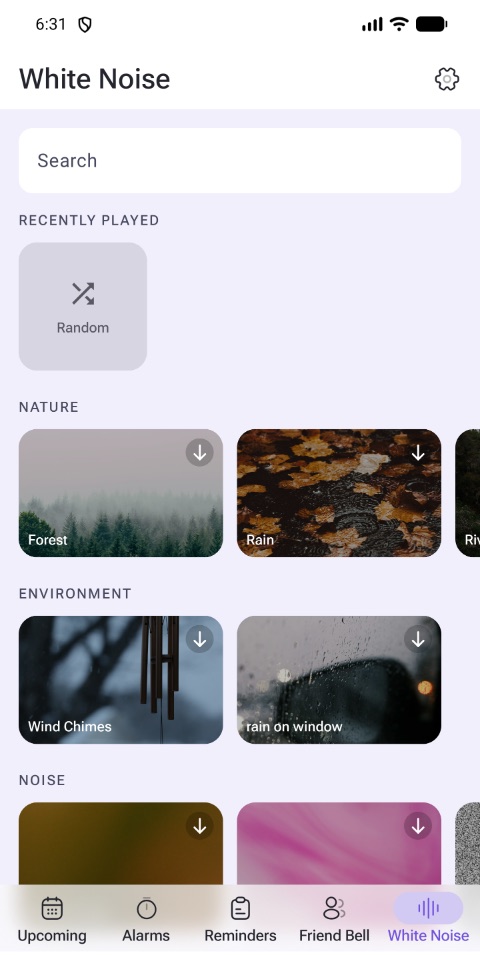
The White Noise screen in Blink Alarm, showing sounds to fall asleep to

Inside the app

Five tabs. One alarm clock.

Blink Alarm isn't one trick. Flip through the app's own screens and see what each part does.

UpcomingWed 27

TODAY

S M T W T F S
6:30 AM
Social alarmMath
Once
1:15 PM
Medicine

TOMORROW

Fajr
4:52 AM
Prayer
Alarms
AllWake-upSocialPrayerMedicine
M T W T F
6:30 AM
Social alarmShake it off
Sat Sun
9:00 AM
Memory
Daily
8:00 PM
Medicine
Reminders
Today TasksTags

TO-DO

Pick up prescription
Wakes you at 8:00
Call the landlord

COMPLETED

Book the dentist
Friends Bell
NA
Nour Adel
Last spoke 7 weeks ago
Call Message

GROUPS

๐ŸŽ“ Universityevery 2 weeks
White Noise
Now playing
Rain on a tent

FEATURED

Ocean at night8h
Slow fan8h
Distant thunder8h

Missions

Prove you're awake.

Silencing an alarm takes a thumb. Finishing a mission takes a brain, which is rather the point. Pick one per alarm, at the difficulty you can stand.

Solve to dismiss ยท 1 of 3

17 ร— 4
58 68 74

Repeat the pattern

Type it exactly

The early morning has gold in its mouth.

The early morning has|

Find the code

QR code to download Blink Alarm

Scan it. This one really works.

Shake to dismiss

18 / 30

Four kinds of alarm

Not every morning is the same.

Get the app
Shared

An alarm with other people in it.

It rings on everyone's phone at the same second. Everybody checks in as they wake, so you can see who is still asleep, then send them a chime, a siren, or your own recorded voice until they are not.

Contacts are sorted by whether they can actually be reached: added instantly, nudged, or sent a link or QR code.

OKOmarChecked in
SHSaraChecked in
HMHanaNudge
Wake-up

The everyday one

Repeat days, snooze from one to thirty minutes, your own audio, and volume and vibration per alarm.

M T W T F
7:00 AM
Memory
Prayer

Prayer times

Follows the daily schedule for wherever you are and moves with it, so you never reset it by hand.

Fajr
4:52 AM
Prayer
Medicine

Doses, on time

Repeat on their own schedule, separate from the alarms that wake you.

Daily
8:00 PM
Medicine
Reminders

To-dos that ring

A task list where anything important enough can wake you at the time it matters.

Pick up prescription
Wakes you at 8:00
Sleep

Get to sleep first

Rain, ocean, fans and thunder, playable offline.

Rain on a tent

Questions

Before you download.

Is Blink Alarm free?

Yes. It is free to download from Google Play and the App Store, and you do not need an account to set an ordinary alarm. Pro unlocks extras through an in-app purchase, and nothing behind it is needed to wake up on time. A few of the newest features land on one platform a little before the other. The app is available in English and Arabic.

Will it still ring if my phone is on silent?

Yes. Alarms play on your phone's alarm channel, which is separate from the ringer and from media volume, so silencing your phone does not silence them. Do Not Disturb and focus modes let alarms through by default on both Android and iPhone. It is worth knowing you can block them yourself in your phone's settings, because that is the usual reason any alarm app looks like it failed.

How does it actually stop me snoozing?

You attach a mission, and the alarm will not dismiss until you finish it. There are five: solving sums, repeating a memory grid, typing a line out exactly, scanning a QR code you left in another room, and shaking the phone. The QR one is the strongest, because it makes you physically leave the bed to reach the code. You can also cap how many snoozes an alarm allows, or switch snooze off altogether.

Can I use my own sound as the alarm?

Yes. Pick any alarm tone or ringtone already on your phone, or bring in your own audio file. Volume is set per alarm, so one can be louder than another without you touching the phone's volume, and each alarm has its own vibration setting. You can also have the sound start soft and build up rather than hit you at full blast, and change the picture behind the alarm screen.

Does it work without internet, and after a restart?

An alarm is scheduled on the phone itself, so it rings with no signal and re-registers itself when you restart. Internet is only needed for the parts that involve other people, such as creating a shared alarm, an invitation arriving or a nudge, and for streaming a white noise sound you have not downloaded yet.

What else does it do besides wake me up?

Prayer times that follow the daily schedule for wherever you are and move with you, medicine reminders, and a to-do list whose items can ring instead of sitting there being ignored. There is a white noise library for falling asleep, and Friends Bell, which nudges you to call the people you keep meaning to call.

Can I share an alarm with someone else?

Yes. A shared alarm rings on everyone's phone at the same moment. Each person checks in as they wake, so you can see at a glance who is still asleep, and you can invite people from your contacts, by link, or by letting them scan a QR code off your screen. Anyone can leave a shared alarm, or turn it off just for themselves without affecting the group.
Stop trusting yourself at 6am.

Free to download, on both stores.

Free on Android and iPhone. No account needed to set an ordinary alarm.

Google Play App Store